9 AI Integrations, No Engineering Team. Here’s What I Built at Alma Insights.
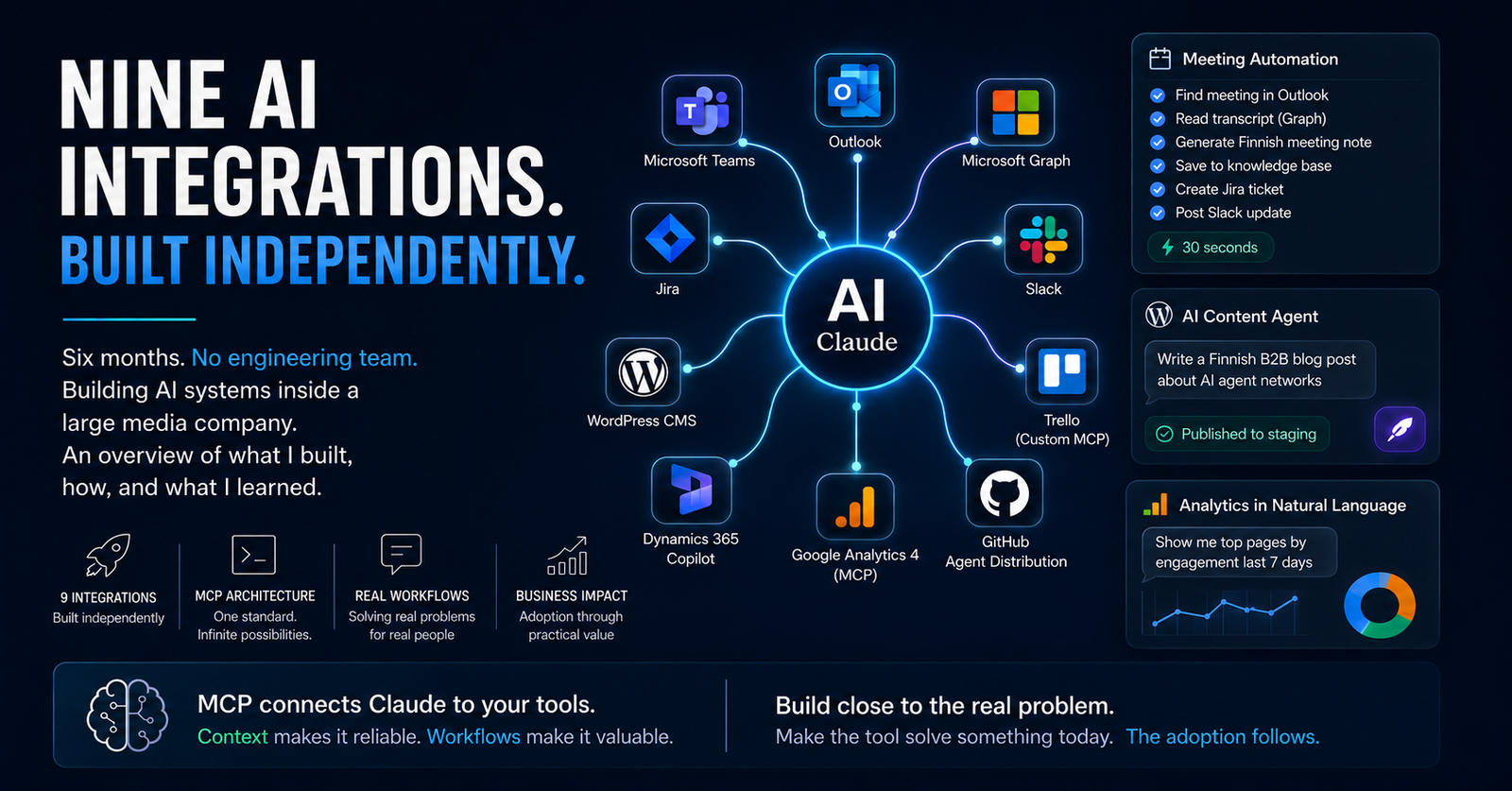
Nine enterprise AI integrations. Built independently at Alma Insights. No dedicated engineering team. This is what six months of building AI systems inside a large media company actually looks like.
The setup
I’m a Technical PM at Alma Insights, part of Alma Media, one of Finland’s largest media companies. My job title says project management. What I’ve actually spent the last six months doing is building AI systems from scratch, alone, without a dedicated engineering team.
No formal AI mandate. No engineering resources assigned. Just real problems that needed solving and the conviction that the best way to learn what AI can do inside a company is to build the thing and find out.
This is an overview of what I built, how, and what I learned.
Enterprise AI Integration Projects
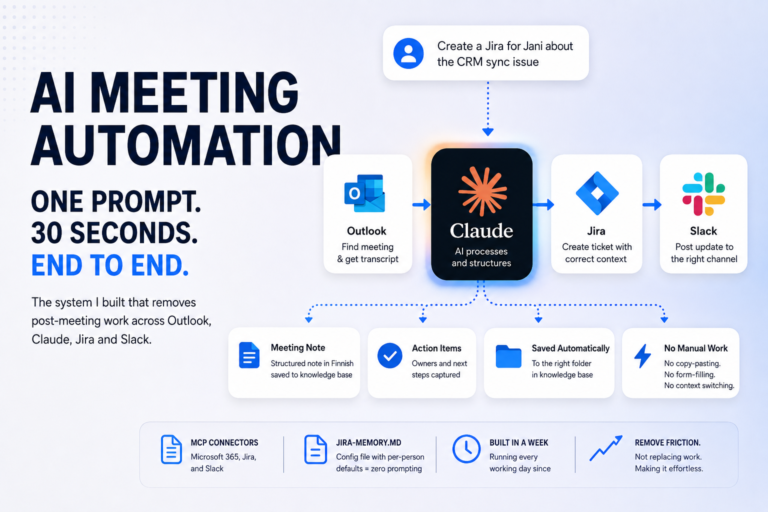
LLM automation suite. The one I’m most proud of. Connects Teams, Outlook, Microsoft Graph, Jira, and Slack through a single conversational workflow. One prompt processes a meeting end-to-end: finds it in Outlook by name and date, reads the transcript via Microsoft Graph API, generates a structured Finnish meeting note, saves it to my knowledge base, creates the Jira ticket with the right project and assignee, and posts the Slack update. What used to take 15 minutes or more of manual admin after every meeting now takes 30 seconds.
Agentic WordPress CMS. An AI content agent that writes, structures and publishes Finnish B2B blog posts with no human in the CMS. Research, tone, product tie-ins, and publishing all handled through conversation. Three posts to staging. The posts are about AI agent networks. They were produced by one.
Custom Trello MCP connector. No official Trello connector existed for Claude, so I built one. A Python script wrapping the Trello REST API, callable from Claude via shell. Supports adding, editing, moving and archiving cards, listing boards, adding comments and labels. Comes with a setup guide written for non-technical colleagues. This has since been upgraded to a custom made FastMCP Trello connection.
Dynamics 365 Copilot rollout. Driving unified AI adoption across the Alma Insights sales team. Evaluating, configuring and rolling out Copilot features as they ship so the whole team benefits consistently, not just individual power users.
GA4 analytics integration. Connected Google Analytics 4 via MCP so any team member can query web analytics conversationally after a one-time authentication. Account summaries, custom reports, real-time data. All in natural language. Also made one prompt for Claude Code so it can do all the steps to setup the MCP.
GitHub-based agent distribution. Building a system for versioning and distributing Claude agents across the organisation. Versioned configs, a runbook for onboarding colleagues, structured for org-wide scale. The catch was that we wanted to avoid getting GitHub accounts to everyone, so the sharing is done with Sharepoint and Claude is keeping the GitHub repo updated.
Internal AI training programme. Designed and delivered a full AI training session for colleagues. Lecture format, live demos, real workflow examples. Shared workflows publicly in our 500-person internal Slack community during AI Growth Week. The format that worked: show your actual workflow, not a polished demo. Max 1-2 Powerpoint slides. And let AI do the slides on the spot. That’s a real workflow.
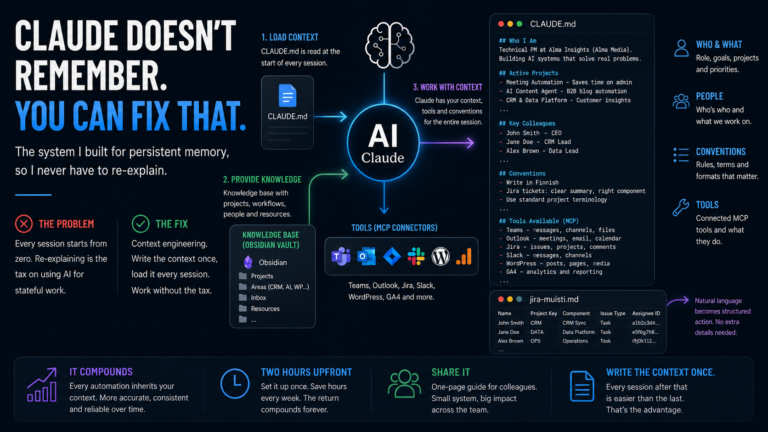
Context engineering layer. The infrastructure underneath everything else. A structured knowledge base with a CLAUDE.md briefing file that gives Claude instant context at the start of every session. Includes projects, tools, colleagues, conventions. Write the context once, every workflow becomes more reliable forever. Even better, let Claude write the context and learn through that.
The pattern underneath all of it
Every one of these integrations runs on MCP — Model Context Protocol, the open standard Anthropic released for connecting AI models to external tools. The architecture is consistent: Claude in the middle, MCP connectors on the edges, a briefing file giving it context.
What changes between integrations is the specific combination of connectors and the config that makes each one work reliably for a particular workflow. The meeting automation uses M365 + Jira + Slack MCP in a chain. The CMS pipeline uses WordPress MCP in a loop. The Trello connector is a custom Python script that behaves like an MCP tool.
Understanding MCP is the unlock. Once you can connect Claude to any tool that has an API, “can this be automated?” becomes a question about the workflow, not the technology.
What I learned
The tools that get adopted are never the ones that are technically impressive. They’re the ones that solve friction someone is feeling right now.
When I built the Trello connector from scratch, colleagues weren’t excited about the Python script. They were excited they could say “move the DNS card to Done” and it just happened. When I shared the meeting automation, the response wasn’t “that’s interesting.” It was “can you set this up for me too.”
That’s the signal worth paying attention to. Build close to the real problem. Make the tool solve something today. The adoption follows.
Business impact first. Technical elegance second. Every time.