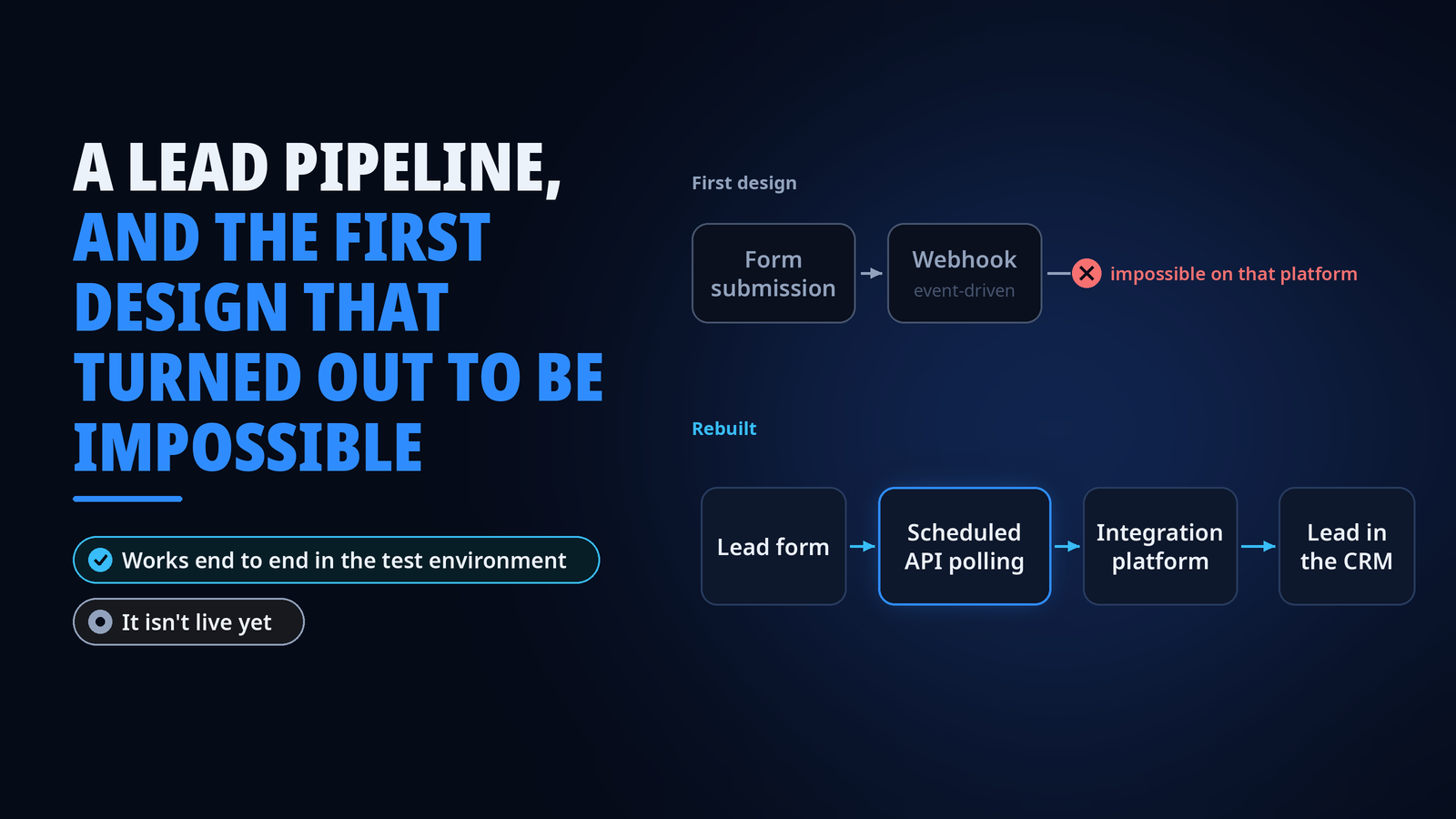
A lead pipeline, and the first design that turned out to be impossible
The first version of our lead pipeline could never have worked, and finding out exactly why was the most useful part of the project.
The problem
I own the migration of our marketing automation onto a new platform, and the lead pipeline that comes with it. The goal is simple to say. Every lead form on the company website should land in the CRM as a Lead, automatically, with the right fields and the right source. Our leads already reached the CRM, but through the platform we’re moving away from. The usual route would have been buying the new integration as a service, and I chose to build it in-house instead, working AI-assisted from design through build. The last time we built a lead process, it took several people, outside partners and a real budget. This time it was me and Claude, in weeks, next to my other projects, and it cost next to nothing.
What I built
The first design was event-driven. A form submission adds the person to a list, the list join fires a webhook to our integration platform, and the integration creates the Lead in the CRM. I checked with the vendor that the events were supported, because near real time was the whole appeal. We built it and tested it, and that’s where it turned out to be impossible on that platform.
Instead of guessing, I narrowed it down. The events either didn’t carry the data the pipeline needed or couldn’t be scoped correctly. I took that to the vendor’s support, and they confirmed it’s a platform limitation with no fix available. Nobody could have known that before trying, which is slightly annoying and completely normal for integrations.
So I rebuilt the pipeline on scheduled API polling. That’s a different architecture, with different failure modes and different guarantees about when data arrives, and I chose it because it’s what the platform actually supports. Patching around the webhook design would have meant building on something the vendor had just told us can’t work.
The first working version of the polling had a costly habit. Every check re-read the whole history instead of only the latest window, so it burned far more Make operations than it needed to, and operations are what Make bills for. Switching to a rolling window cut the operations each check uses by roughly 85 to 90 percent.
Every lead also has to say which landing page it came from, and the site has over 150 of them. Before building the mapping, I used my CRM connector to check which pages actually bring in leads and which don’t. Together with marketing we decided to leave that cleanup for later, so I built the mapping for every page from a full crawl of the site, with a fallback for anything unmapped.
Along the way I also set up a dedicated service identity with its own scoped credentials for the integration platform’s shared connections.
What happened
Every form and field is now mapped and moved over, and the pipeline is verified end to end in the test environment, including the landing-page routing and the error alerting, which I tested by forcing a failure and checking that the alert actually fired. It isn’t live yet, and that’s on purpose. It goes live together with the website’s new forms, with no changes needed on the pipeline side. What’s left is the switch to production and a separate notification path, so sales hears about new leads even if the pipeline has a bad day.
What I learned
“It didn’t work” is not a finding, but “here’s exactly why it can’t work, confirmed by the vendor” is, and that kind of finding lets you change the architecture with a clear conscience instead of patching forever. Also worth saying plainly, there’s no AI inside this pipeline. It’s deterministic plumbing, which is exactly what a lead pipeline should be. The AI was in how I built it. I’m not a developer, so I designed the flow and the rules, and Claude built the Make scenarios. I hardly opened Make myself, except to read run histories while debugging.
The bigger lesson is what this means for everyone else. People who know their processes and their business can now automate straightforward workflows themselves, in days or weeks instead of quarters. Partners and consultants are still needed for the big and complex work, but a lead flow like this one no longer needs a multi-quarter project, and next I’m onboarding colleagues to automate their own work the same way.
Stack
- LianaAutomation for marketing automation
- Make.com as the integration platform
- Microsoft Dynamics 365
- Scheduled REST API polling